Unifying IntentKey
An independent redesign concept for a fragmented audience intelligence ecosystem.
Project receipts
- Role
- I designed. Independent product designer
- Team
- Just me. No stakeholders, no engineering, and no user testing.
- Timeline
- 2026, after my time at Inuvo ended in May. Before that I was the sole UX designer for IntentKey products there.
- Tools
- Figma
- Platform
- Web, B2B SaaS
A concept, not a shipped product.
While I was at Inuvo, people talked about consolidating IntentKey's related dashboards into one. The work never started. After my time there ended in May 2026, I picked the problem back up on my own.
Everything labeled Concept · 2026 on this page is design I made after that, with no involvement from Inuvo and no user testing. Everything labeled Legacy · Inuvo is a real screen from the tools as they were.
- RealLegacy · Inuvo
- Screens from the Inuvo tools as they were, some of which I designed. They show what this concept responds to.
- NewConcept · 2026
- Everything else. I made it after my time at Inuvo ended, on my own. All names, IDs, and numbers are synthetic.
- Not claimed
- That it shipped, that anyone at Inuvo approved it, or that it has been tested with users. None of that is true.
The short version: An independent concept, grounded in tools I worked on. It didn't ship, nobody at Inuvo approved it, and it hasn't been tested.
Four tools, four ways of saying the same thing.
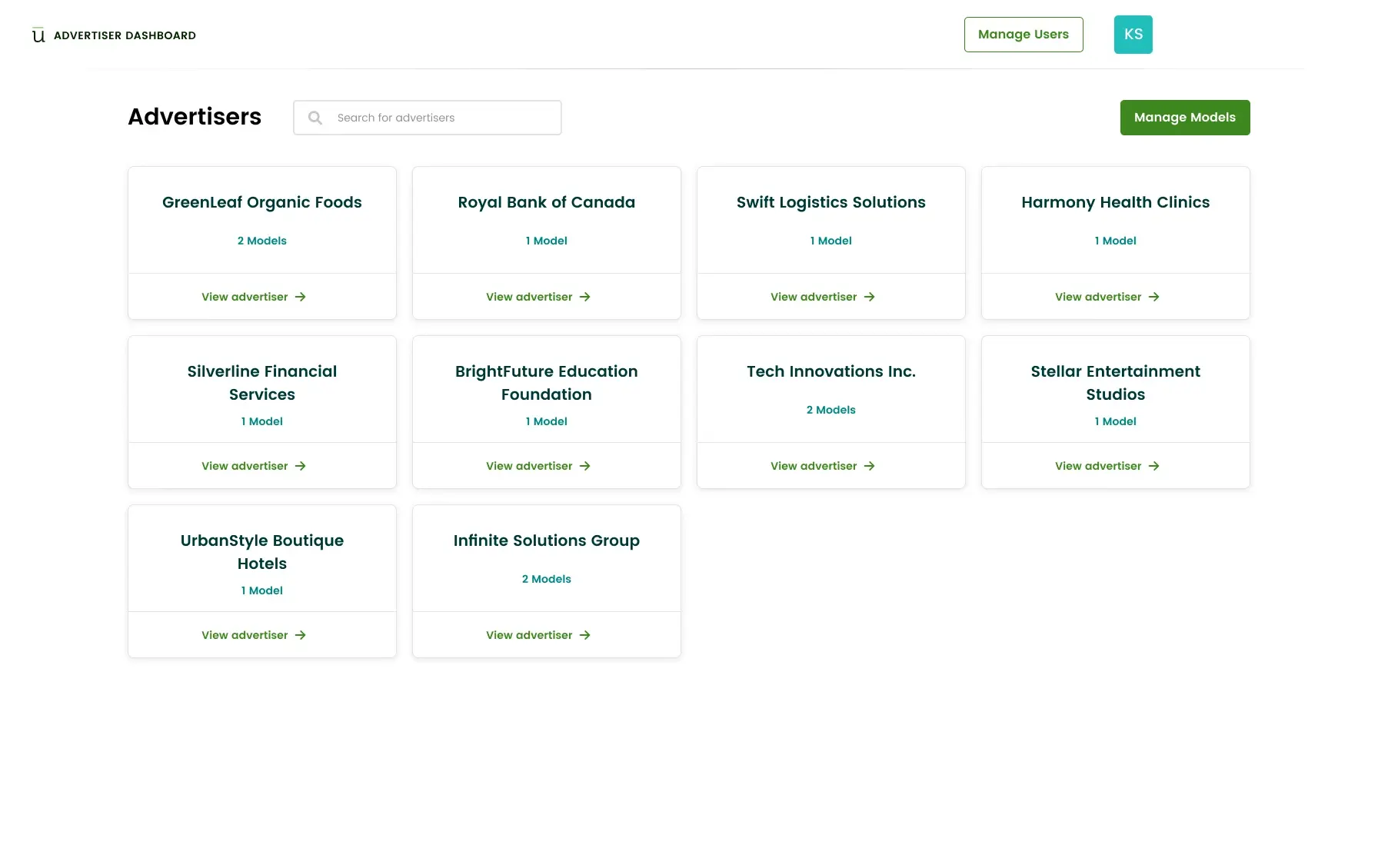
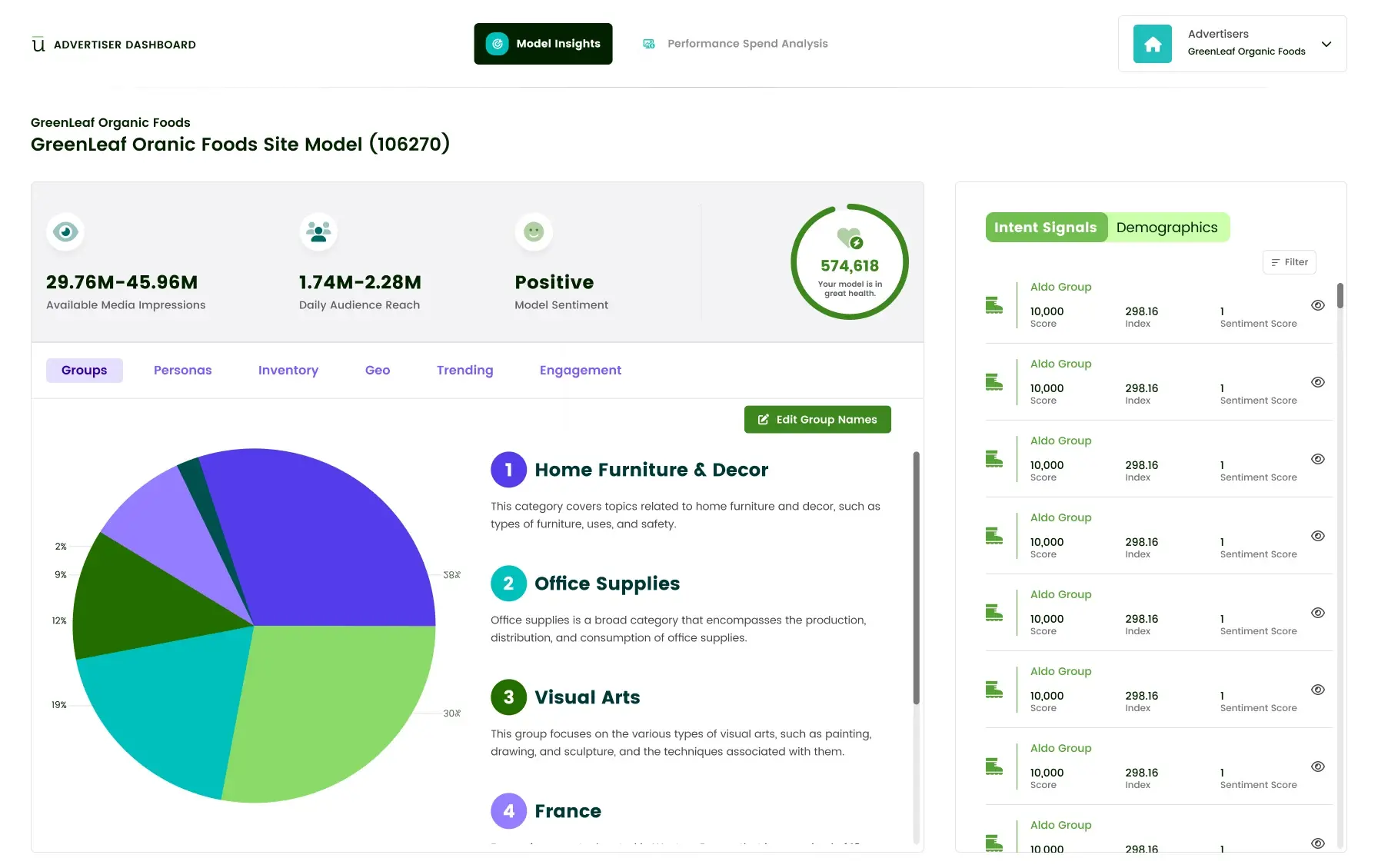
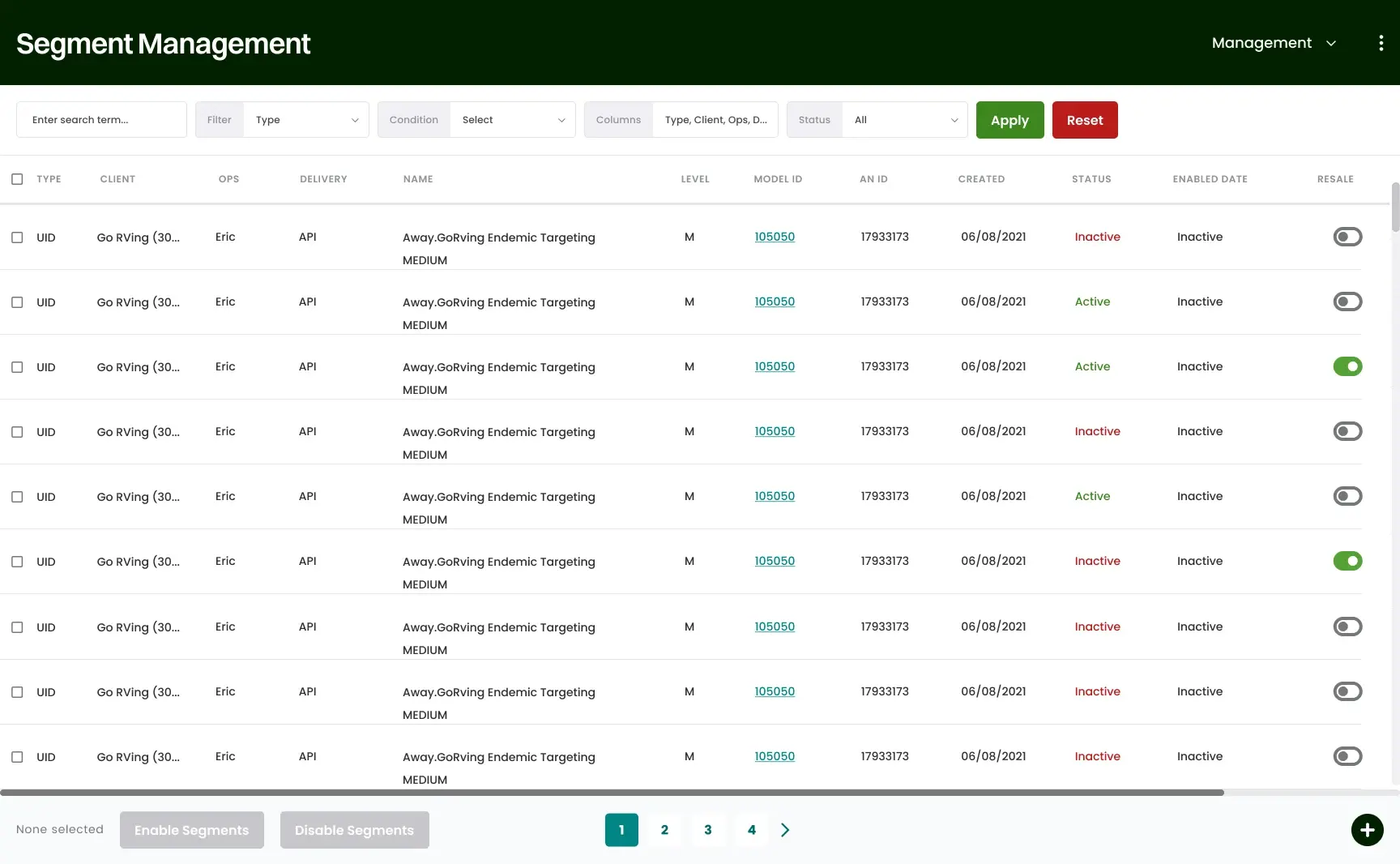
By the time I left, the IntentKey ecosystem had grown into separate applications for separate jobs. The Advertiser Dashboard showed models and insights. Segment Management handled segments, and the Domain and Location tools sat inside it. A separate Advertiser Manager set up accounts. Each one had its own header, its own palette, and its own vocabulary.
The planning document I worked from spells out what that costs. Advertiser setup and model insights live in different apps. Segment management and reporting are disconnected. Domain and Location tools are buried. And client and internal views are different enough that a customer success manager can't easily reproduce what a client is seeing.
Scroll sideways inside the frame, or open it full size.
Scroll sideways inside the frame, or open it full size.
Scroll sideways inside the frame, or open it full size.
Scroll sideways inside the frame, or open it full size.
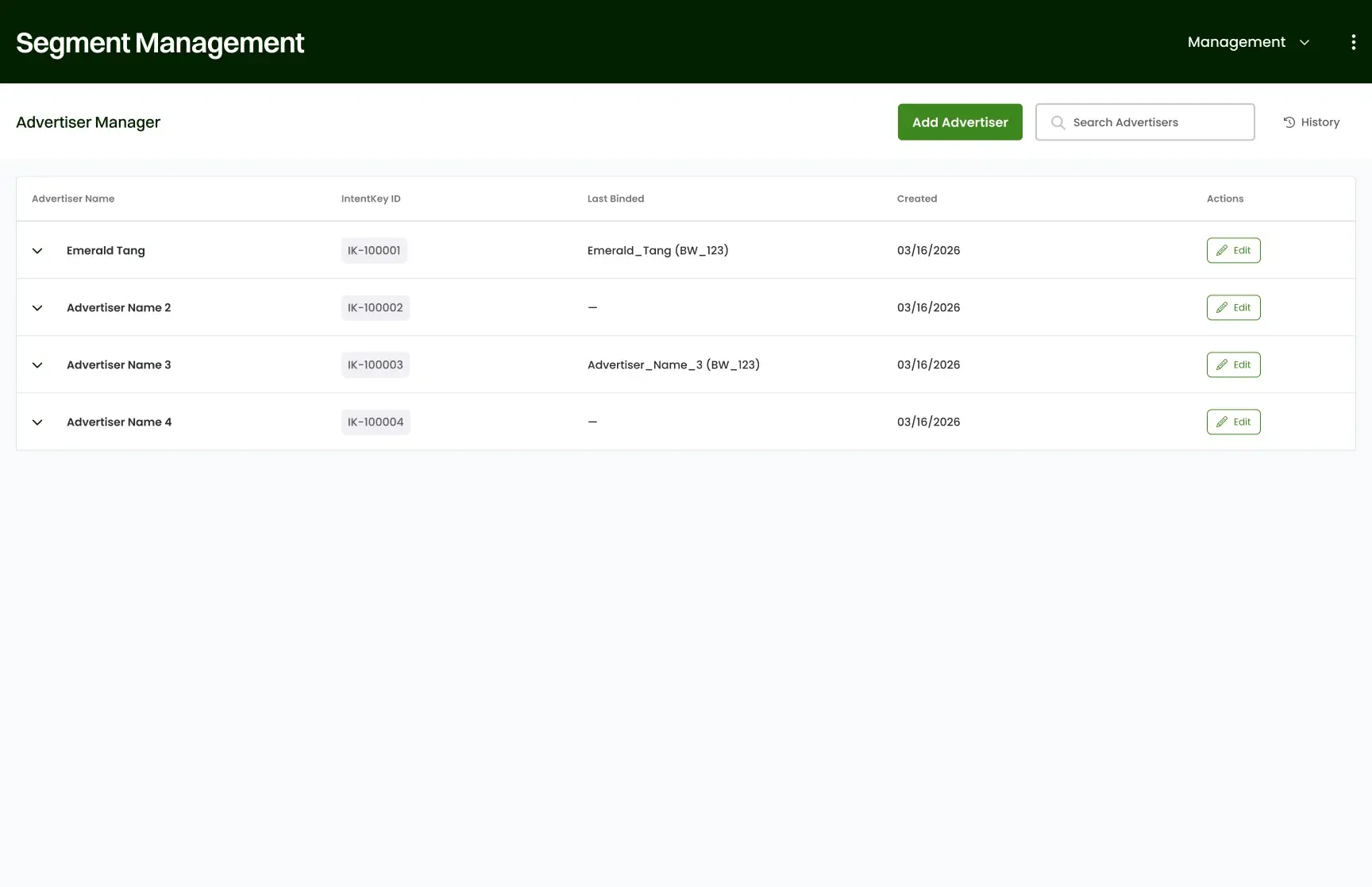
The Advertiser Manager is real Inuvo work, and it is one of the pieces that would eventually have rolled up under a single dashboard with permissions. I show it here as evidence of the problem, not as part of the concept.
The short version: The same advertiser, model, and segment showed up in several tools with different names and no visible connection.
Consolidation is not aggregation.
Putting four sets of old menus into one new sidebar would leave the fragmentation exactly where it was. So I started from the objects instead.
An advertiser is the account. Models hold audience intelligence for it. Segments turn a model into something that can be delivered, and a DSP or endpoint is where they go. Inventory, reports, users, and an activity log support all of it.
Scroll sideways inside the frame, or open it full size.
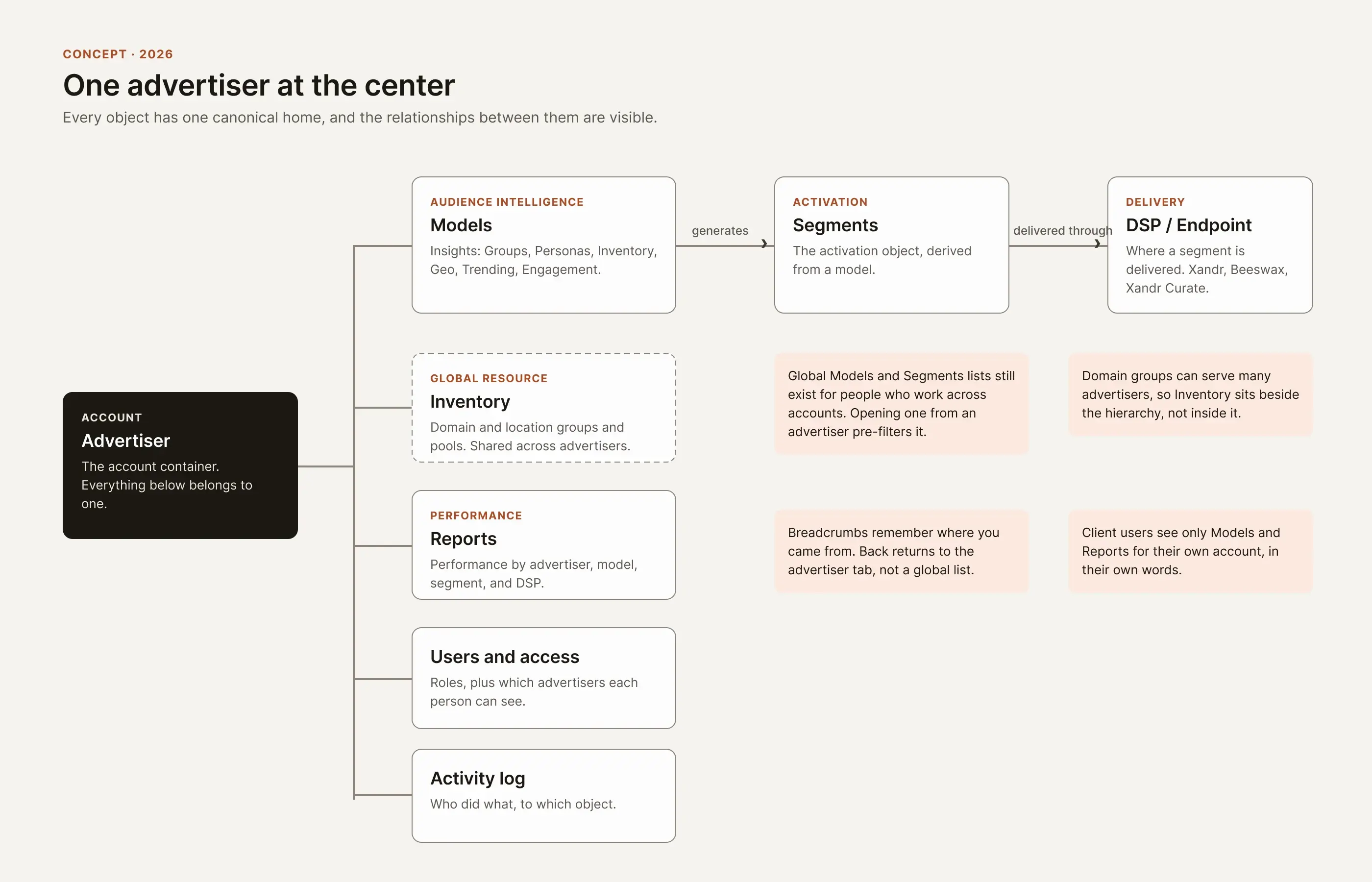
Two things pull against each other here. A hierarchy is easy to understand, but some people work across accounts, and some resources, like domain groups, belong to many advertisers. So the concept keeps global lists for Models and Segments, and opens them pre-filtered when you arrive from an advertiser.
Scroll sideways inside the frame, or open it full size.
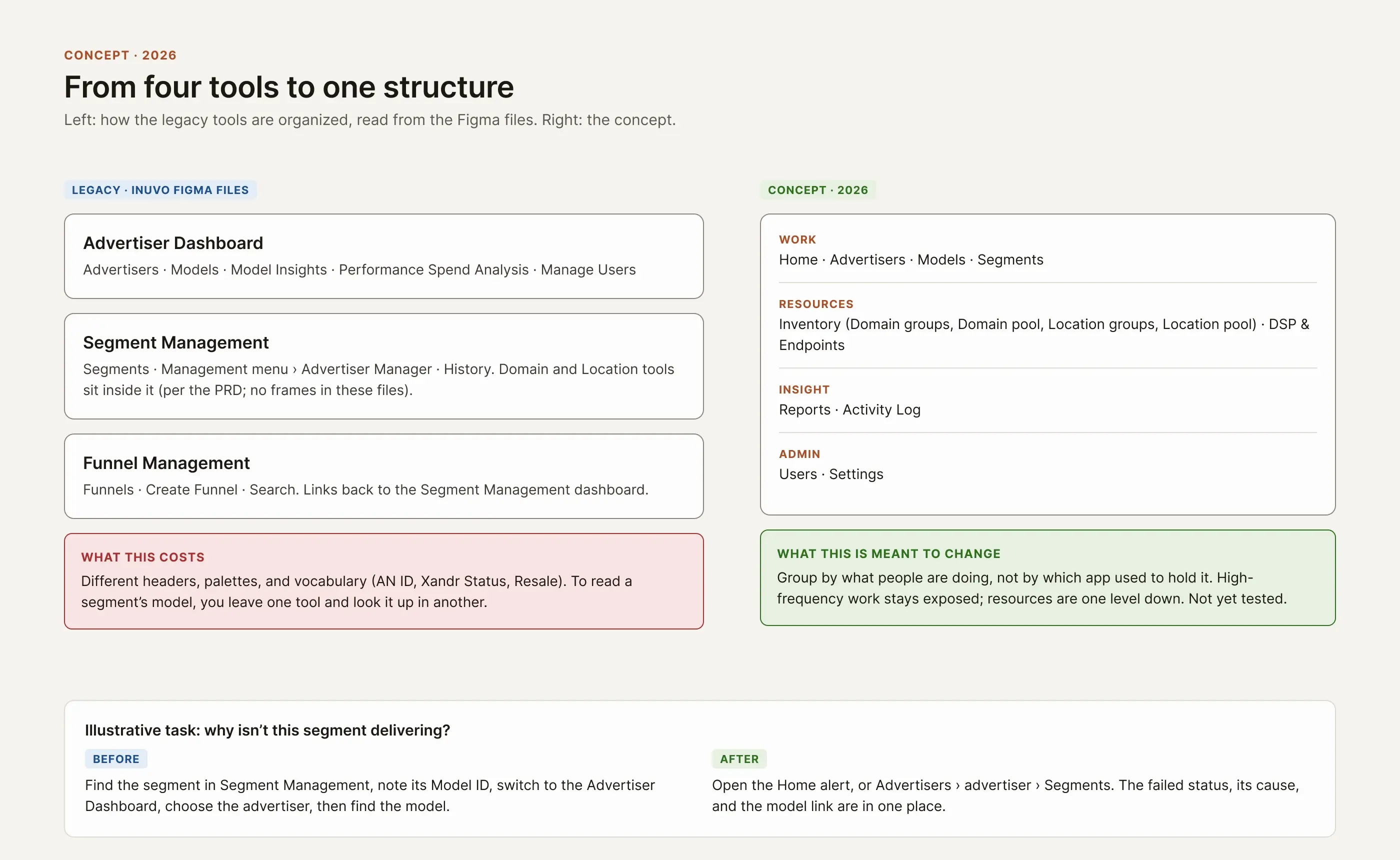
The sidebar groups navigation by what people are doing: Work, Resources, Insight, and Admin. High-frequency tasks stay exposed, and resources like Inventory sit one level down. I haven't tested whether that grouping holds up.
The short version: Give every object one home and show how they connect, then build the navigation from that.
Same product, different starting point.
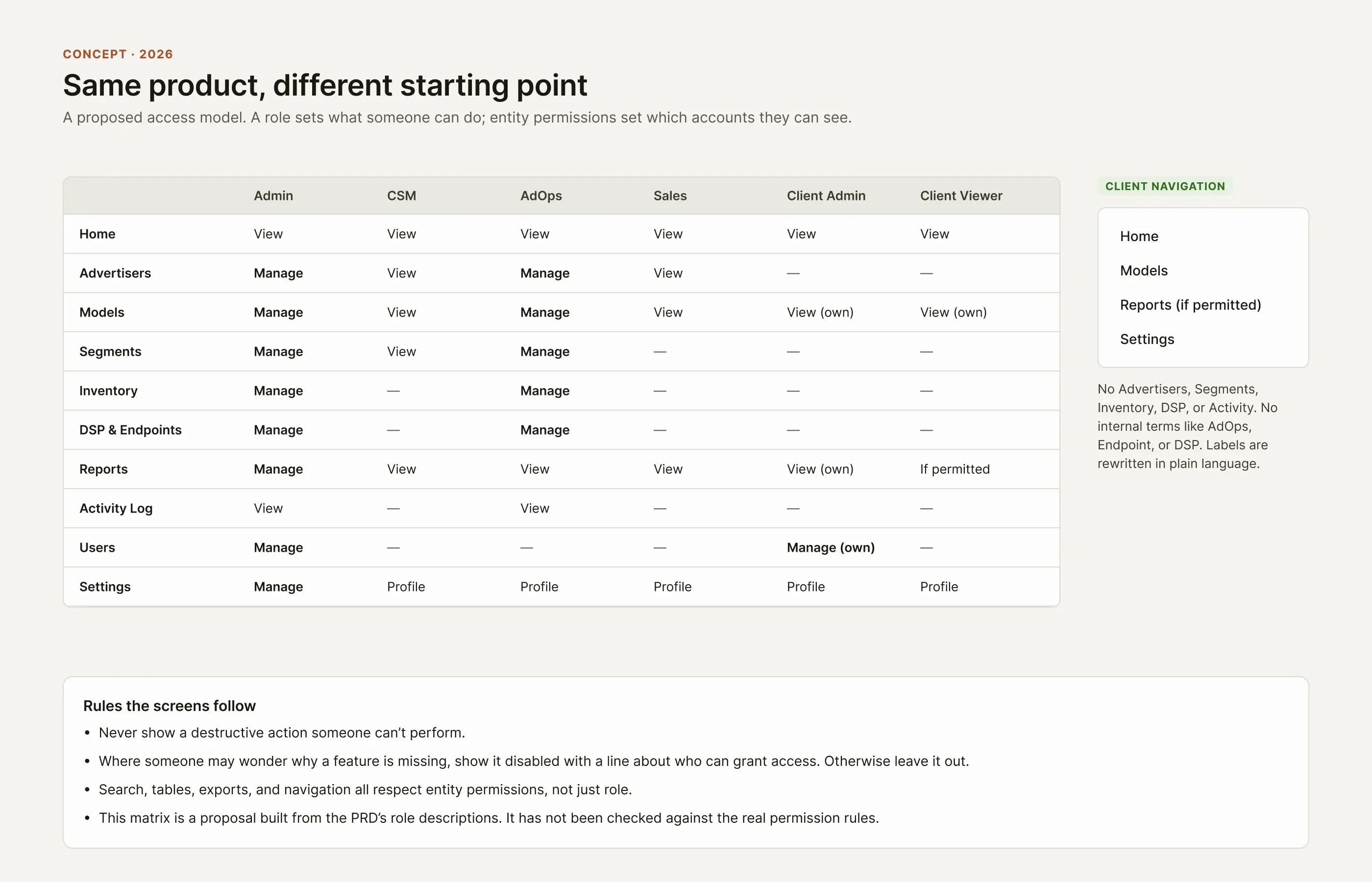
An AdOps person fixing delivery and a client reading model insights are doing different jobs. Rather than one overloaded dashboard, the concept is one system that changes its navigation, actions, and language by role, and by which accounts a person can see.
These are working roles taken from the planning document. They are not personas from research.
Scroll sideways inside the frame, or open it full size.
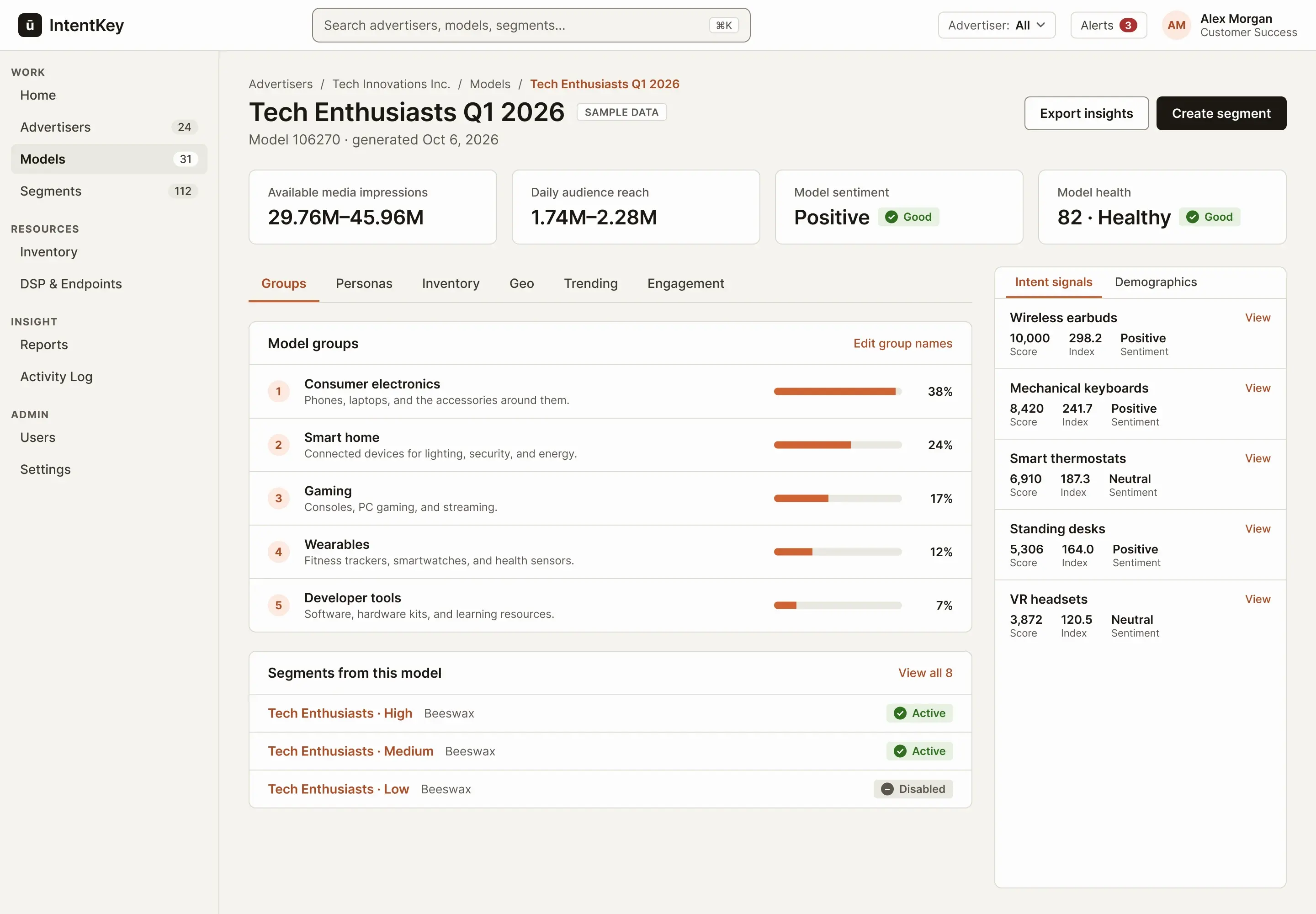
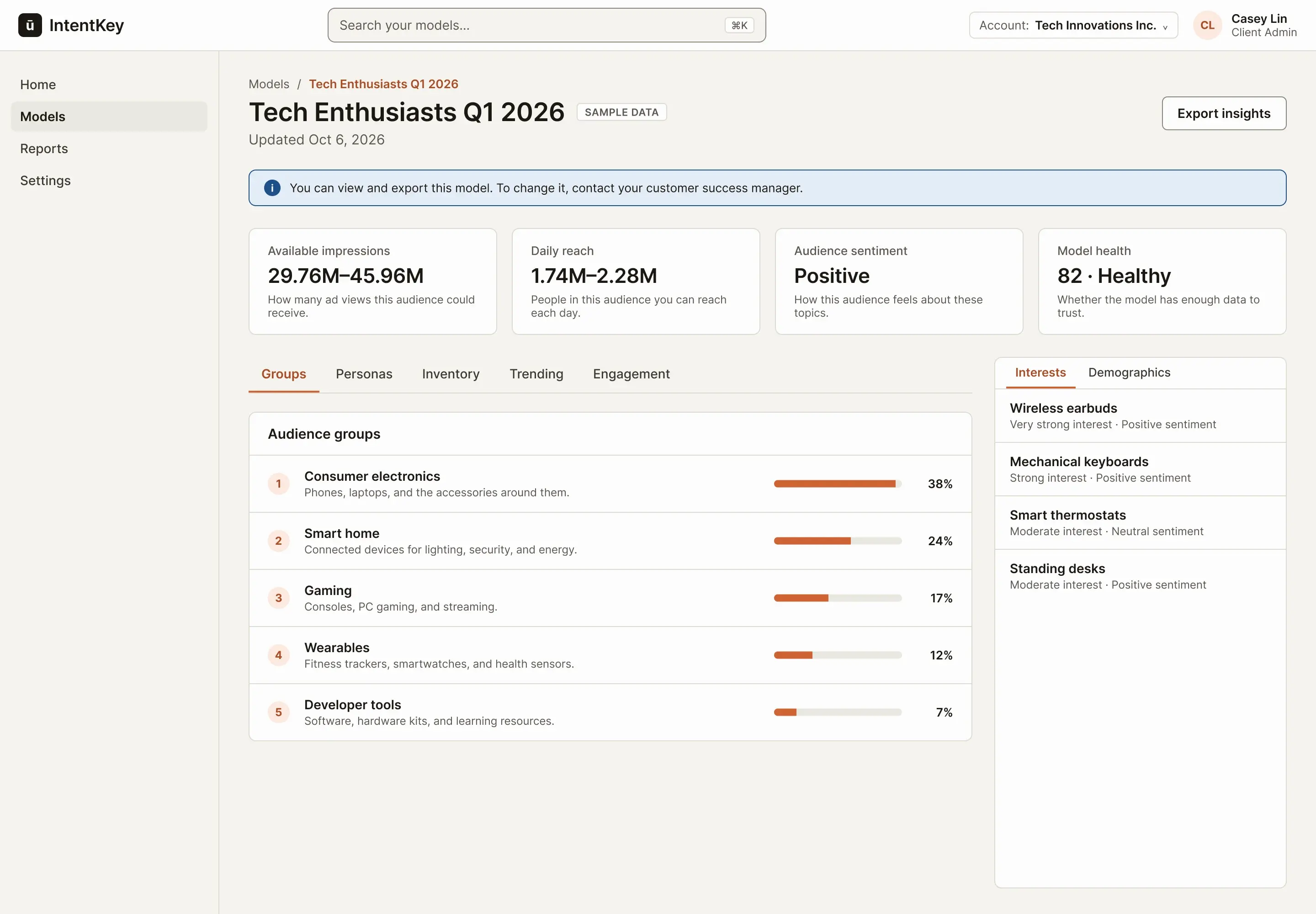
Here is the same model for a Client Admin. Compare it with step 3 of the first flow below.
Scroll sideways inside the frame, or open it full size.
 1234
1234- 1
Four items, no internal terms. Home, Models, Reports, and Settings. No Advertisers, Segments, Inventory, or DSP.
- 2
A limit, explained. It says what you can do and who to ask, instead of hiding the controls without a word.
- 3
Plain-language help. Each figure gets one line saying what it means. That wording is mine and would need checking against the real definitions.
- 4
Interests, not scores. The rail drops the internal index and score and describes interest in words.
The short version: One system, with the language and the controls adjusted to who is looking.
From advertiser to model to segment, and back.
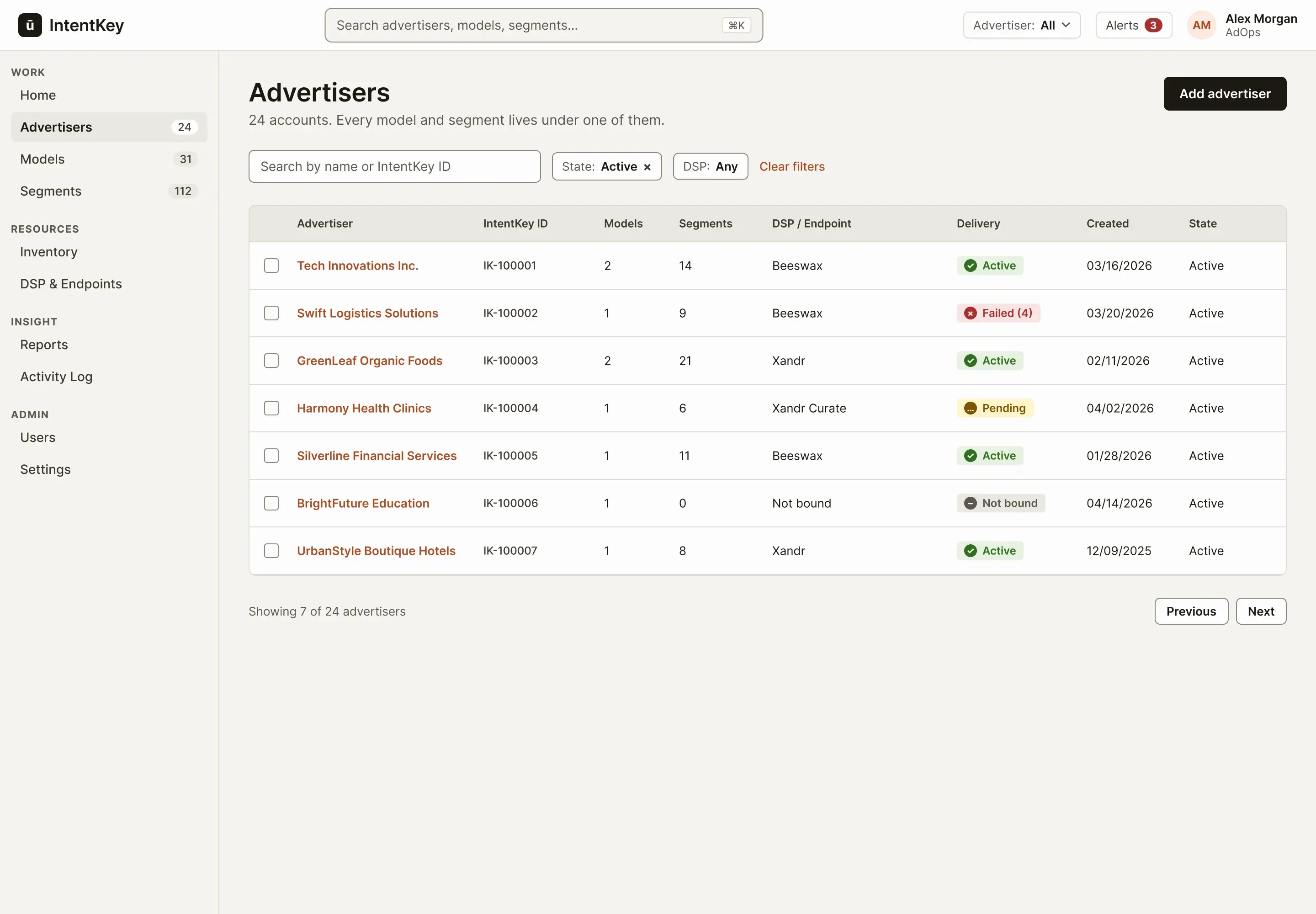
A customer success manager has a call in ten minutes and needs the latest model for an advertiser. This flow follows that path through four frames, and the point is that you can always tell where you are and how to get back.
Step 1 of 4: Find the advertiser
Scroll sideways inside the frame, or open it full size.
 123
123- 1
Filters are chips. What is applied is visible and removable, and Clear filters is always in the same place.
- 2
Contents at a glance. Each account shows how many models and segments sit under it.
- 3
Delivery before you click. Failed (4) is an icon, a word, and a count, so you know how big the problem is without opening the account.
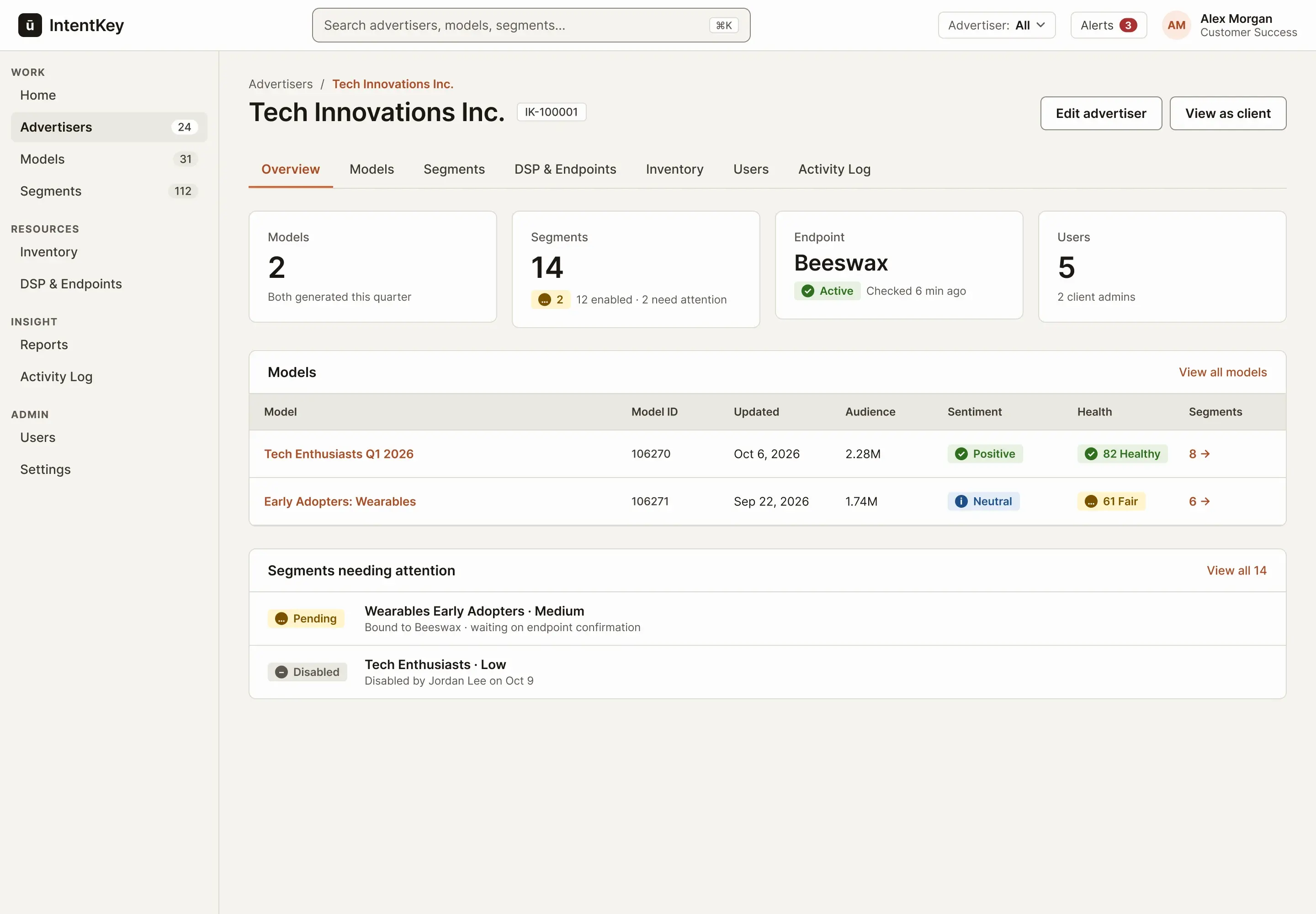
Step 2 of 4: The account, with its models
Scroll sideways inside the frame, or open it full size.
 1234
1234- 1
Where you are, and the way back. The breadcrumb names the account. It is also what the Back link returns to later.
- 2
Endpoint status lives here. Delivery status is part of the account, not a separate tool to check.
- 3
The link between insight and action. Each model says how many segments came from it, and links to them.
- 4
Attention first. Pending and disabled segments are listed on the account, so a CSM sees them before a client call.
Step 3 of 4: The model, with the way back
Scroll sideways inside the frame, or open it full size.
1234- 1
Context travels with you. The breadcrumb carries the advertiser. Back lands on that advertiser's Models, not on a global list.
- 2
Same figures, same names. Available media impressions, Daily audience reach, Model sentiment, and Model health keep the labels from the original model view.
- 3
A rail that stays put. Intent signals sit beside the tabs, so you can change tabs without losing them.
- 4
Closing the loop. The model lists the segments made from it, so you can go forward without leaving.
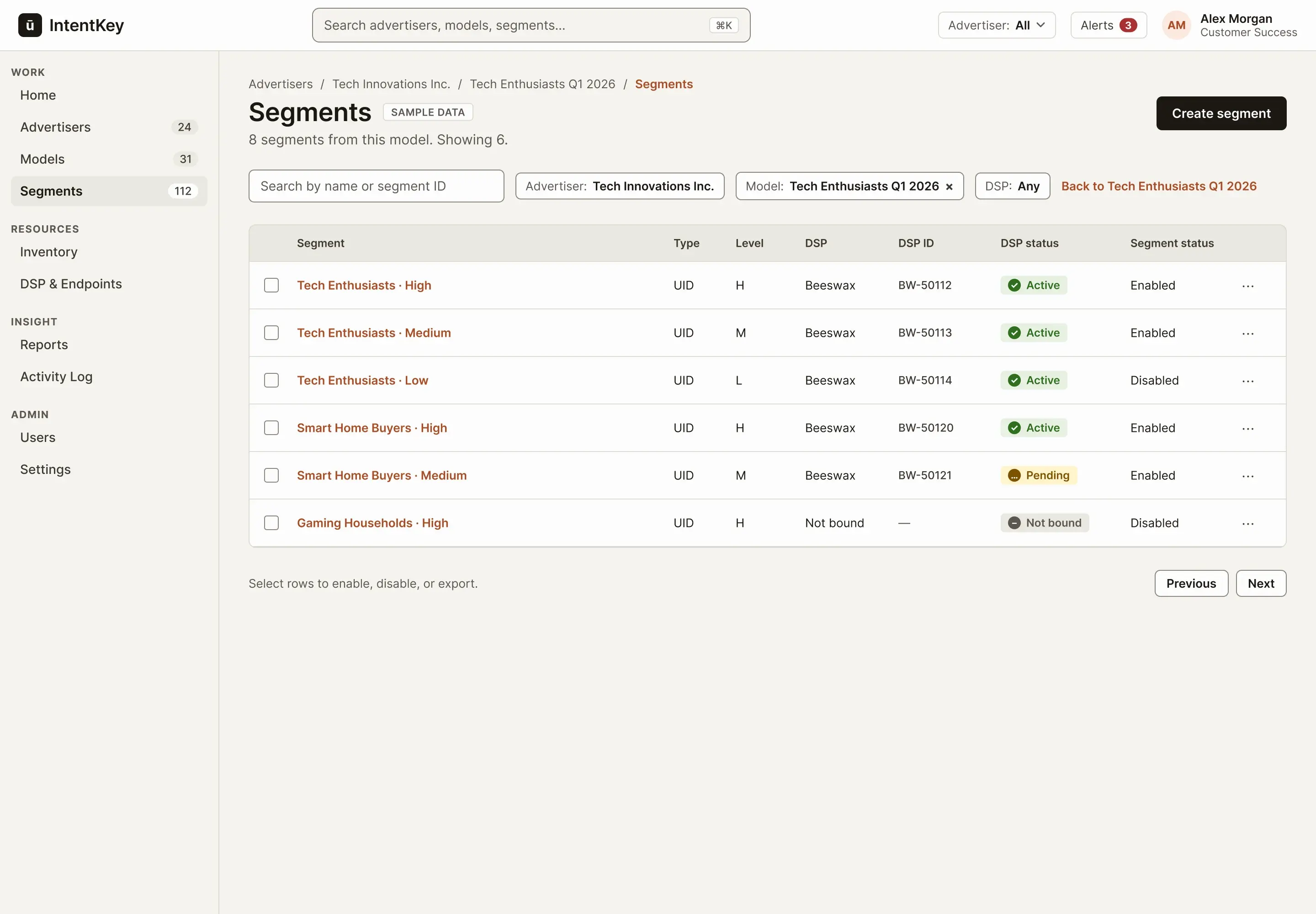
Step 4 of 4: Its segments, pre-filtered
Scroll sideways inside the frame, or open it full size.
 123
123- 1
Scoped, not separate. The advertiser chip is locked and the model chip can be removed. It is the same list as the global one, so there is one table to learn.
- 2
Pending is not Failed. Active, Pending, Failed, and Not bound each have their own icon and word.
- 3
Select to act. Rows can be selected for bulk actions. The bar appears only when something is selected.
The short version: You move between advertiser, model, and segment without losing your place.
A failure you can see, and fix once.
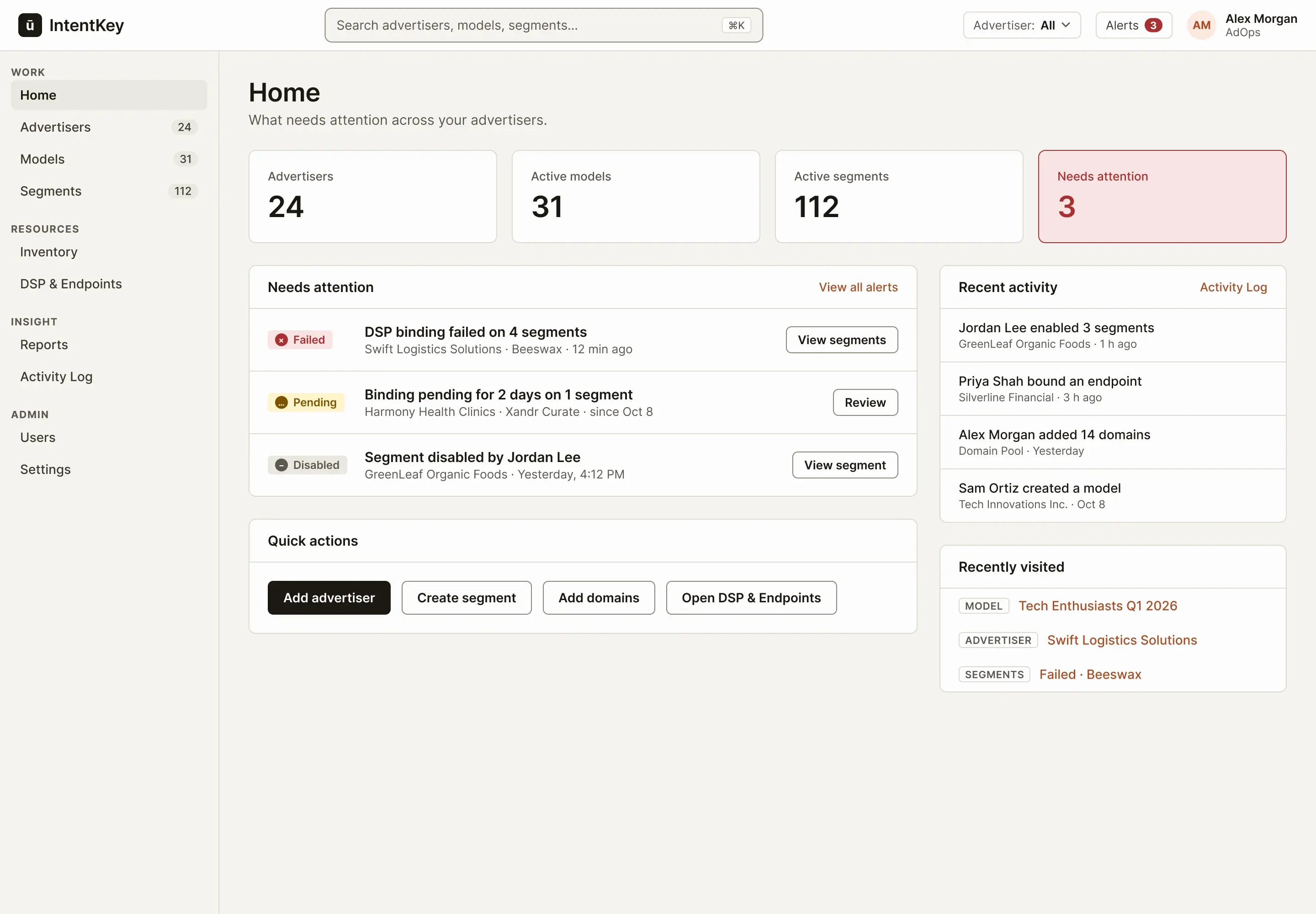
An AdOps person starts the day and one advertiser's segments have stopped delivering. In the old tools that could sit inside a record. Here it is the first thing on Home, and the fix happens once.
Step 1 of 4: Home leads with the failure
Scroll sideways inside the frame, or open it full size.
123- 1
One alarming number. Needs attention is the only tinted card, so it is the first thing the eye lands on.
- 2
Alerts that say what and where. Each names the advertiser, the DSP, and what happened, and leads to the filtered list.
- 3
Quick actions by role. AdOps gets add advertiser, create segment, add domains, and DSP & Endpoints.
Step 2 of 4: The affected segments
Scroll sideways inside the frame, or open it full size.
123- 1
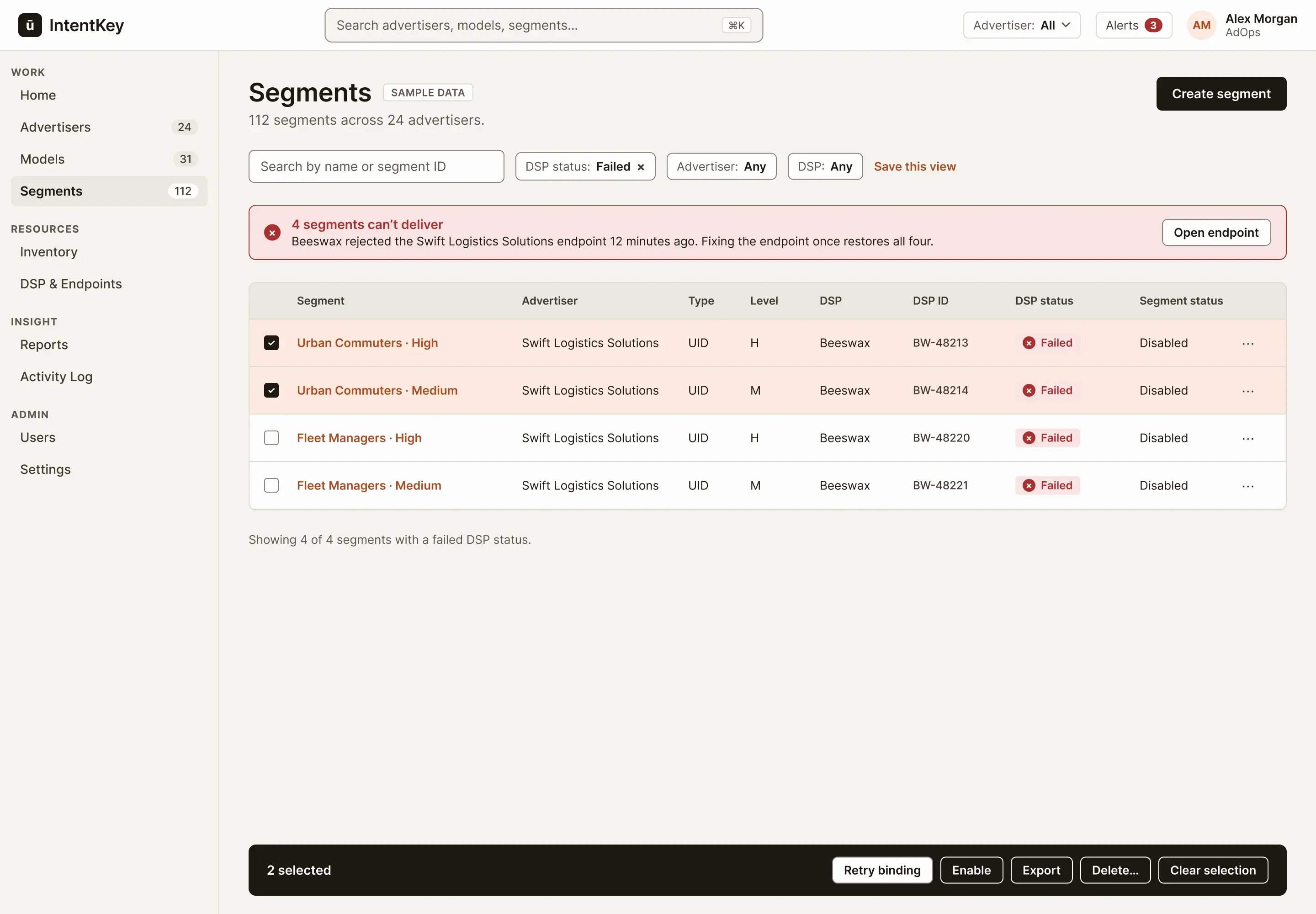
One banner for one cause. Four segments, one endpoint. The action is fixing the endpoint, so the banner says so.
- 2
Selection is not color alone. Selected rows are ticked and tinted.
- 3
Anchored bulk bar. It shows the count and the actions. Delete ends in an ellipsis because it asks to confirm.
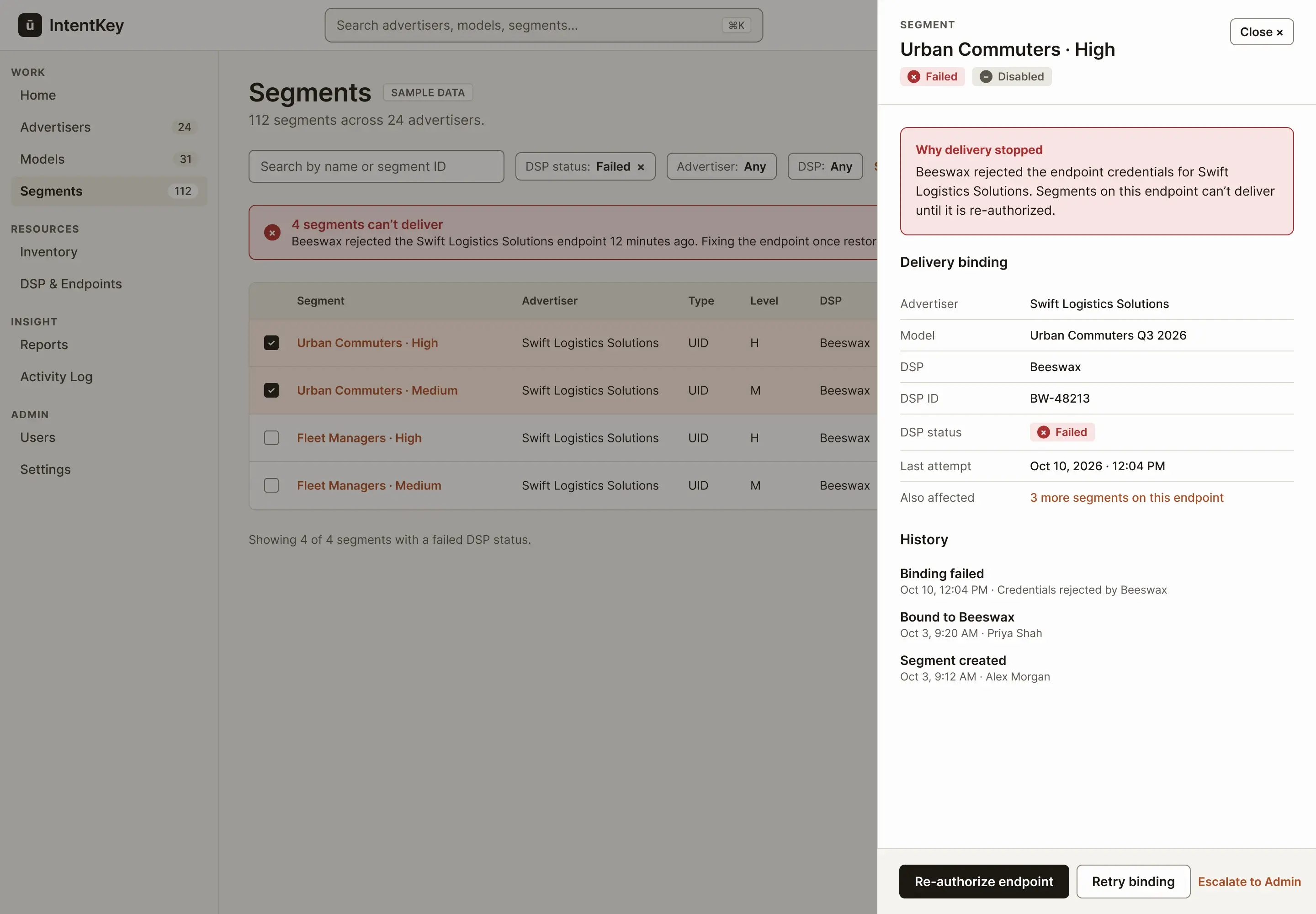
Step 3 of 4: Why it failed, and the fix
Scroll sideways inside the frame, or open it full size.
 123
123- 1
The cause, in plain words. It leads with why delivery stopped, before any fields.
- 2
DSP terms, corrected. DSP and DSP ID replace the legacy labels, so Platform is left to mean the public product.
- 3
One primary action. Re-authorize the endpoint fixes all four. Retry is secondary, and Escalate is there if you can't.
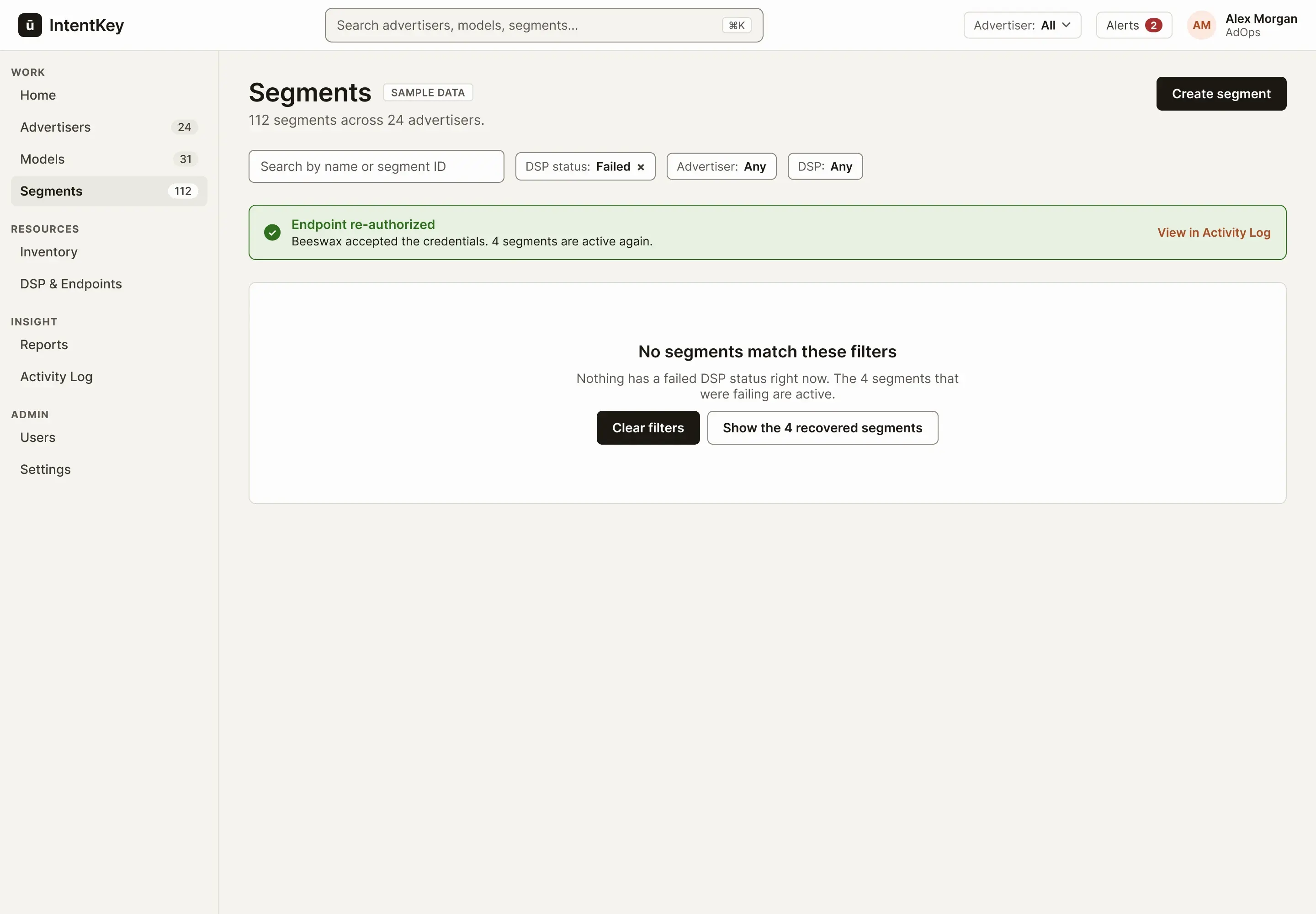
Step 4 of 4: Recovered
Scroll sideways inside the frame, or open it full size.
 12
12- 1
Success, announced. A brief message that links to the Activity Log. It is a live region, so screen readers hear it too.
- 2
An empty state with a reason. No results is explained, and the next step is one click: clear the filters, or see what recovered.
The short version: Status shows before you click, and the screen that explains a failure is also the one that fixes it.
The same table, everywhere.
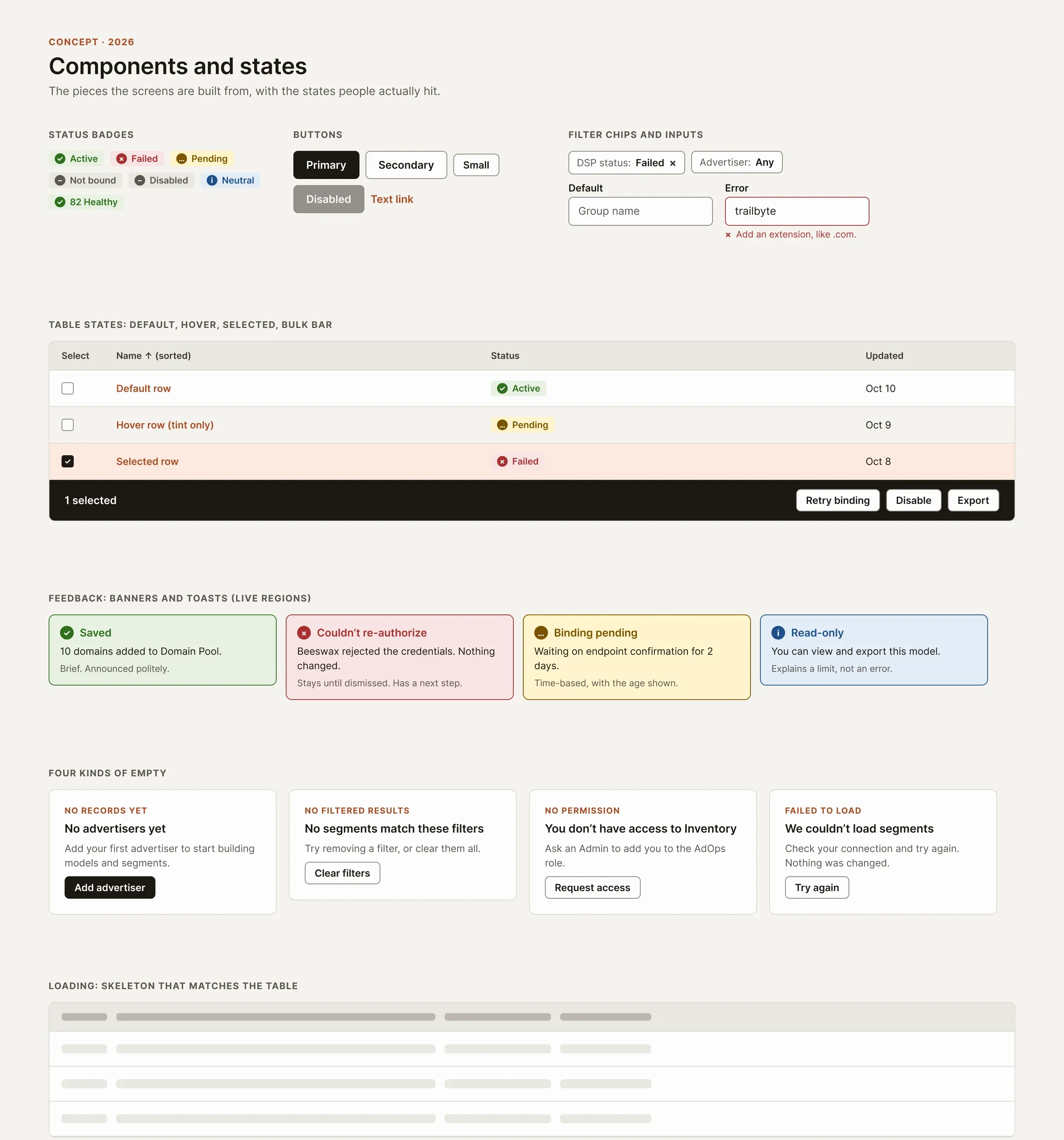
Advertisers, segments, domains, and groups all use one table: search, filter chips, sortable headers, selectable rows, a bulk action bar, and four kinds of empty state. Learning it once pays off on every page.
Status is always an icon, a word, and a color, never color alone. Every text pair meets 4.5:1, and borders and graphics meet 3:1. Building that table of ratios caught a real mistake in my first palette: the accent text was just under the line on the page background and on selected rows, so I darkened it.
Scroll sideways inside the frame, or open it full size.
Scroll sideways inside the frame, or open it full size.
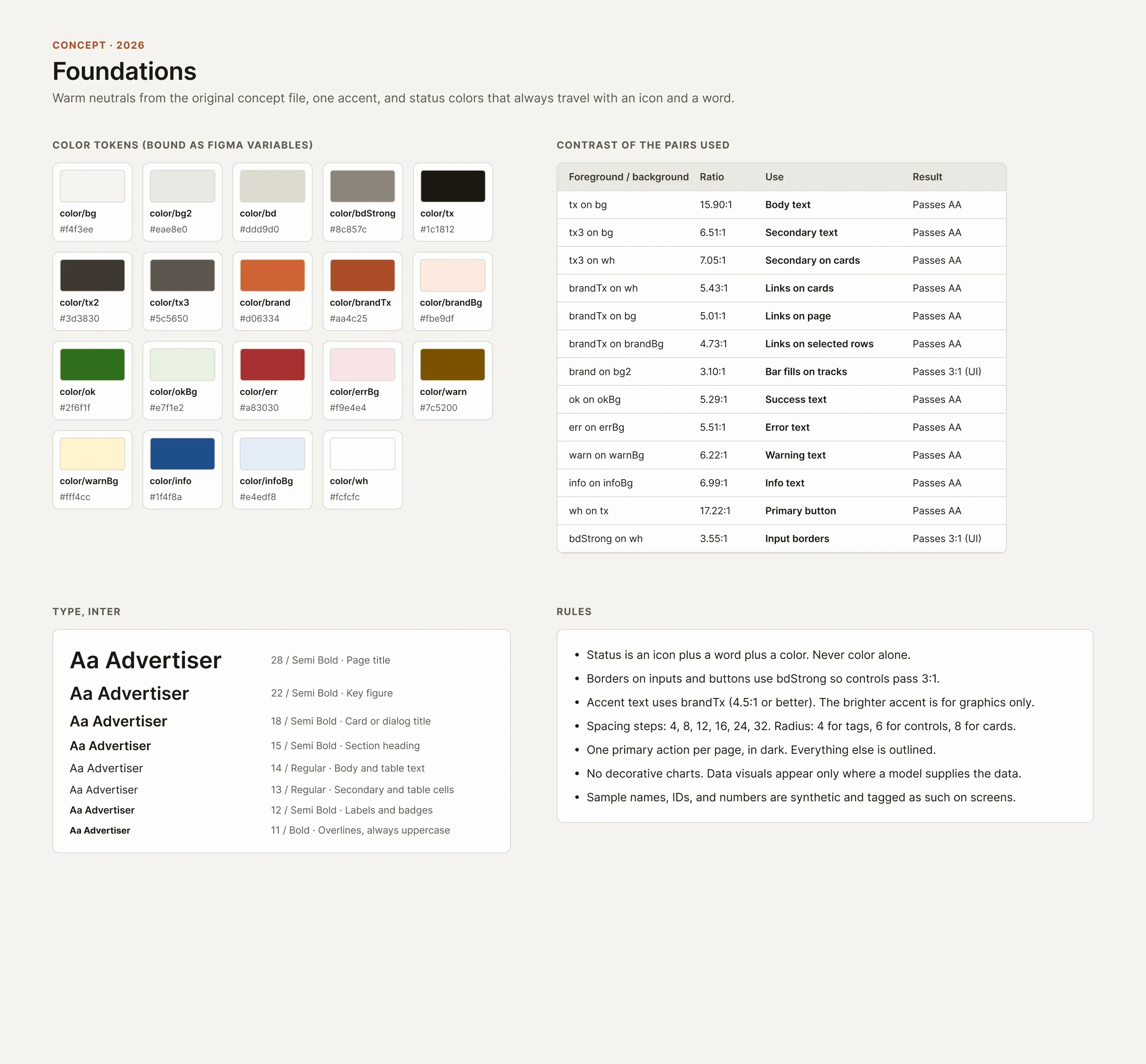
The short version: One set of components keeps four tools from drifting apart again.
A bad entry shouldn't cost you the other thirteen.
Adding domains is repetitive work. Paste a list, find out what's wrong, keep what's right, and build a group. The old pattern of rejecting a whole batch for one bad row punishes the person for a small mistake.
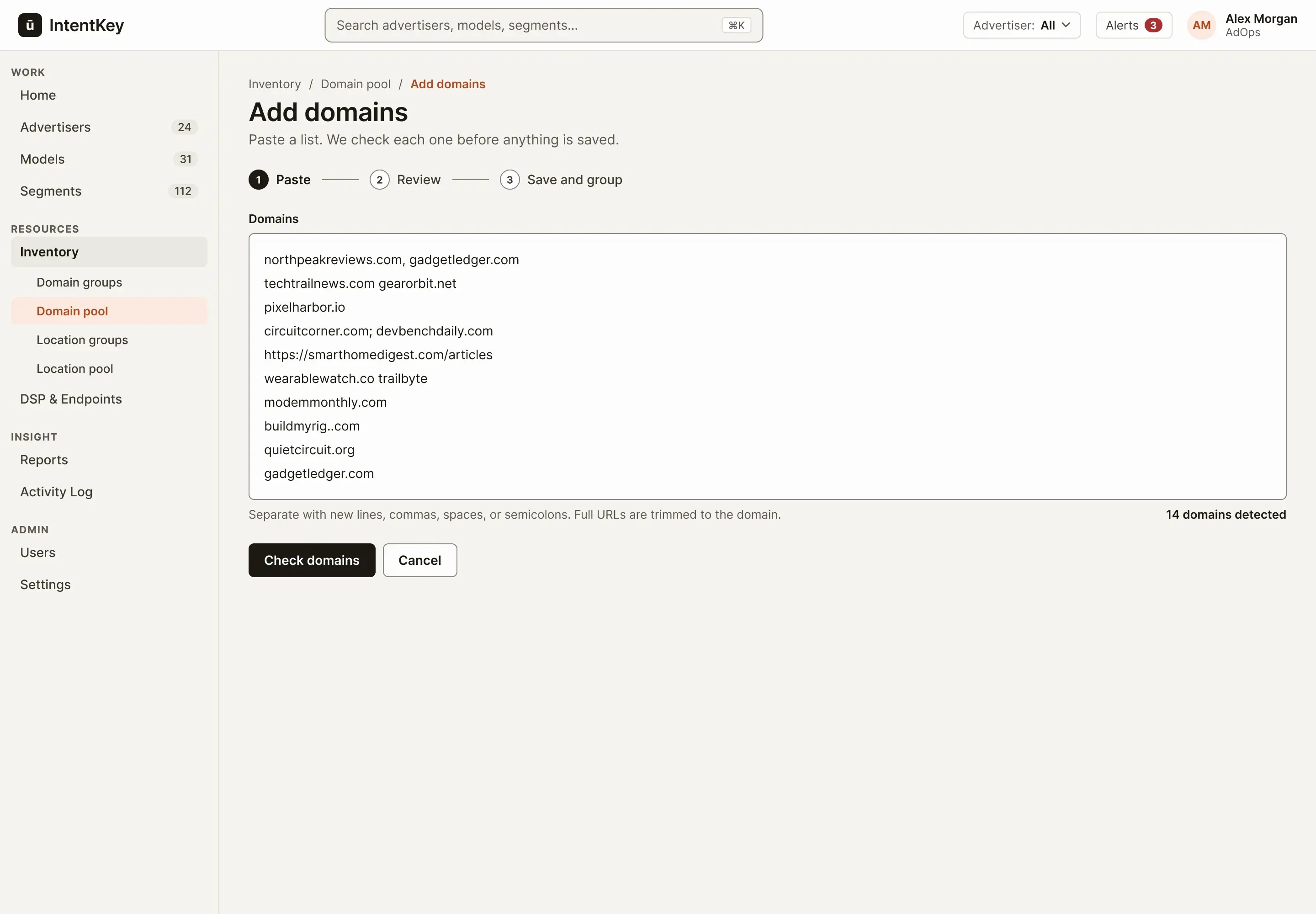
Step 1 of 4: Paste
Scroll sideways inside the frame, or open it full size.
 123
123- 1
A page, not a small modal. Checking and grouping are separate decisions, so it gets three steps and room to breathe.
- 2
Forgiving input. Commas, spaces, semicolons, new lines, and full URLs all work.
- 3
A live count. 14 detected tells you the paste was understood before you commit.
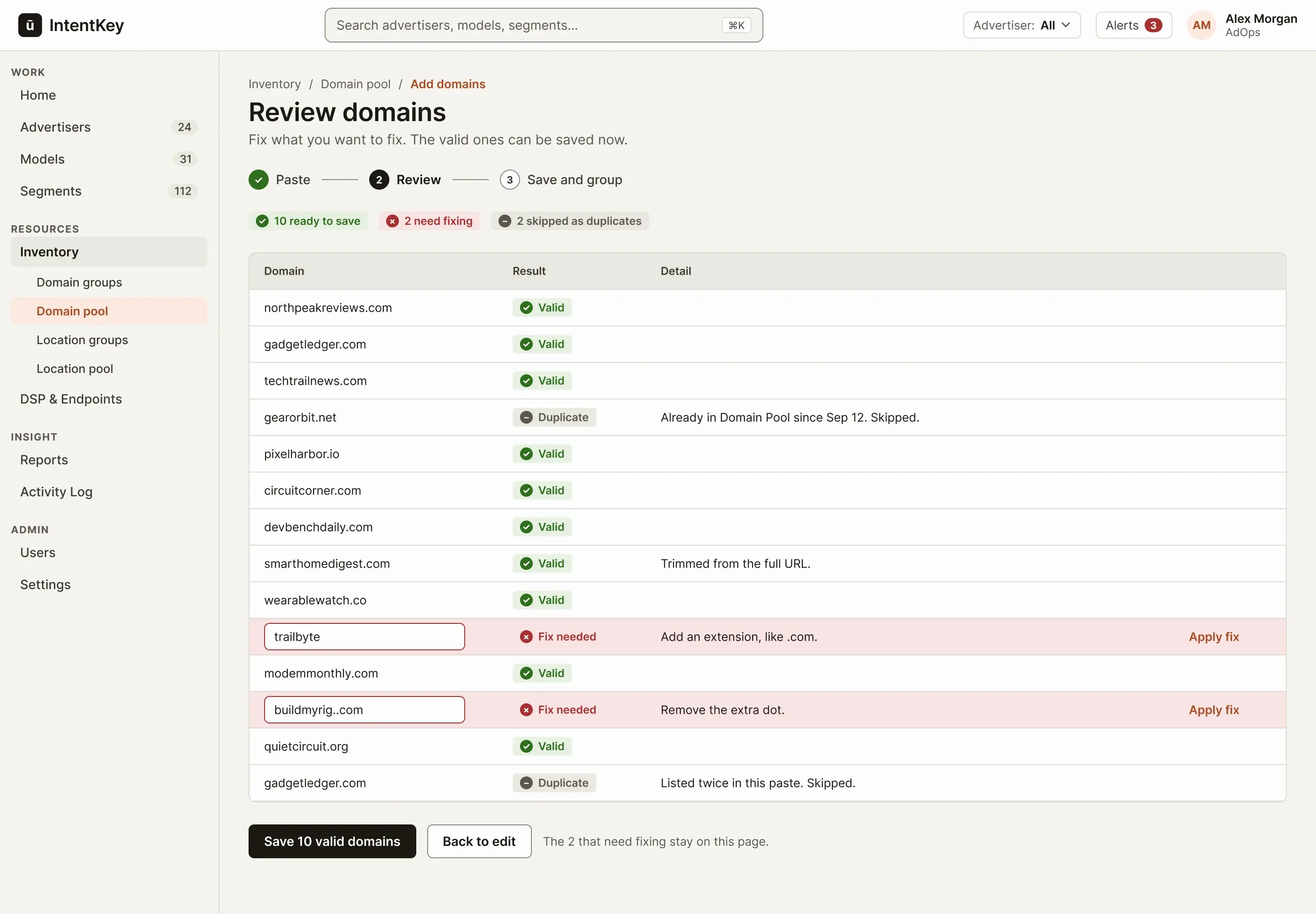
Step 2 of 4: Check, with partial failure
Scroll sideways inside the frame, or open it full size.
 123
123- 1
The outcome up front. Three counts tell you where you stand before you read a row.
- 2
Fix in place. Invalid entries are editable inline, with the reason beside them.
- 3
Save what's valid. Ten saved now. The two that need fixing stay on this page.
Step 3 of 4: Save the valid ones, then group
Scroll sideways inside the frame, or open it full size.
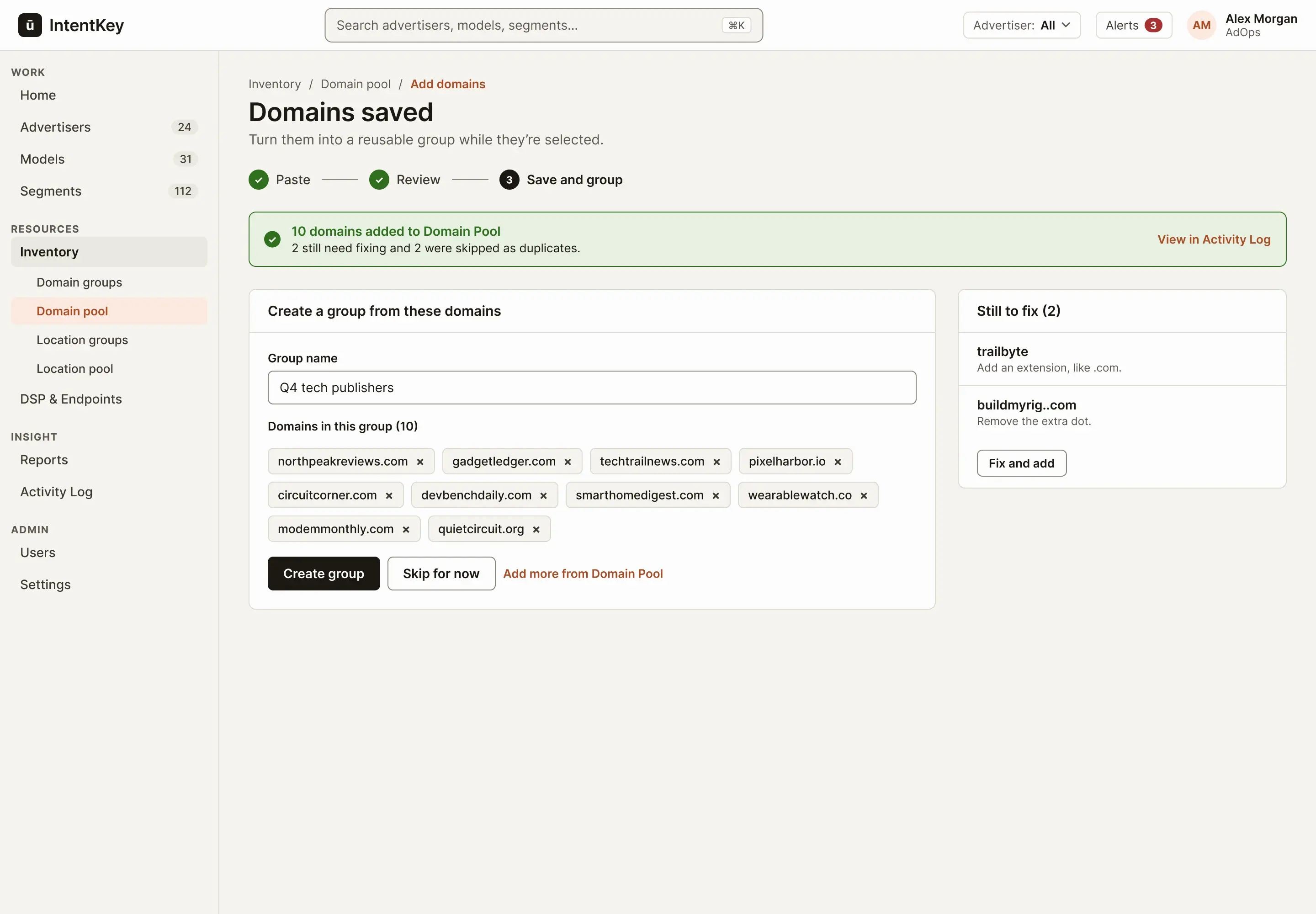 123
123- 1
Honest about the rest. The message says ten were added, and what happened to the other four.
- 2
Selection carries over. The ten domains are already in the group, so grouping takes one click.
- 3
A short to-do list. The two failures wait here, instead of vanishing.
Step 4 of 4: The group
Scroll sideways inside the frame, or open it full size.
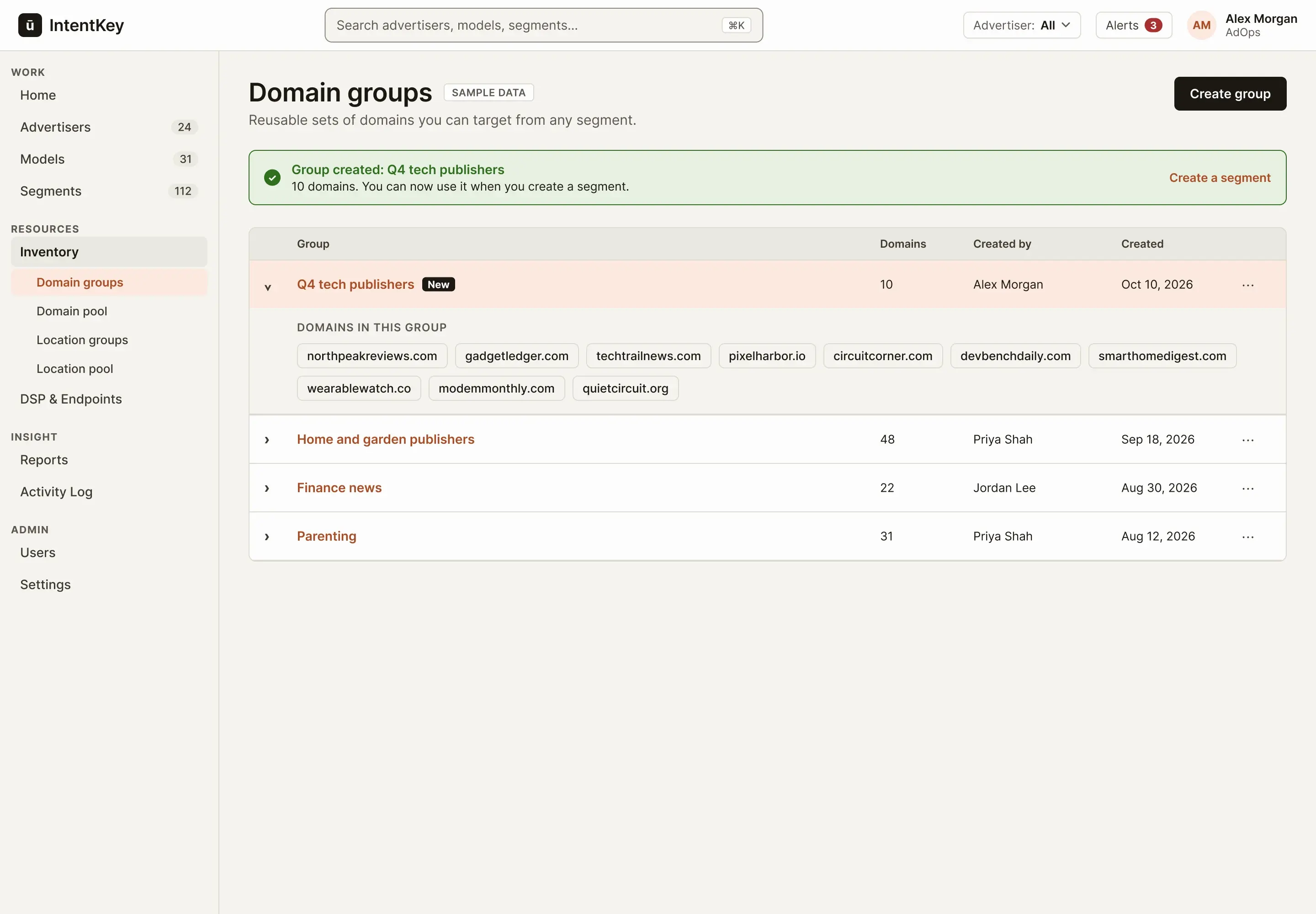 12
12- 1
A way forward. The message offers the next task: create a segment that uses the group.
- 2
Proof it worked. The new group is marked New and expanded, so you see the ten domains you just built it from.
The short version: Save what's valid, keep the rest on the page with a reason, and make the next step one click.
Four decisions, and what each one costs.
None of these are validated yet. They are the choices I'd most want to test.
1Advertiser-first, with global lists
- Problem
- Setting up an advertiser, reading its model, and managing its segments happened in different tools, so people rebuilt the relationship in their heads.
- Choice
- The advertiser is the anchor. Models and Segments also have global lists, and opening one from an advertiser arrives pre-filtered, with a way back.
- Why
- It mirrors how accounts work, and it gives every object one canonical home.
- Tradeoff
- People who work across accounts still need global entry points, so there are two doors to the same list. They have to stay consistent.
2Inventory moves out of Segments
- Problem
- Domain and Location tools were nested inside Segment Manager, so you had to know to look there.
- Choice
- Inventory becomes its own group: Domain groups, Domain pool, Location groups, Location pool.
- Why
- These are reusable resources shared across advertisers, not a feature of one segment.
- Tradeoff
- It adds navigation breadth. Grouping the sidebar as Work, Resources, Insight, and Admin is the offset, and it needs testing.
3DSP status shows before you click
- Problem
- A failed binding could sit inside a record while segments quietly stopped delivering.
- Choice
- A status badge with an icon and a word in every table, a Home alert, and a drawer that says why it failed and offers the fix.
- Why
- The people who can fix a binding see it first, and one fix can clear every affected segment.
- Tradeoff
- Too many alerts become noise. The Home list is limited to things that need action.
4Partial success for bulk domains
- Problem
- One bad entry in a pasted list shouldn't cost someone the other thirteen.
- Choice
- Check first, save every valid domain, keep the failures on the page with inline fixes, then offer to build a group.
- Why
- It respects the work already done, and the problems become a short to-do list.
- Tradeoff
- More states to design and build, and people have to notice what was skipped. The summary and a dedicated list are there for that.
How I'd test this.
I haven't run any of the following. It is a plan.
- A tree test with six to eight internal users, to see whether people can find things in the new structure.
- Task tests with customer success and AdOps people on the advertiser overview and the segment flow.
- A think-aloud session with three or four AdOps people on the bulk domain flow.
- A short comprehension test with clients on the model insights wording.
- A task test to see whether people discover bulk actions on their own.
- A heuristic review of what each role can and can't see.
What I'd measure, once there is a baseline. These are targets, not results:
- Time to the first relevant action, under 60 seconds.
- Completion of core internal tasks, above 90%.
- Recovery after an error, above 80%.
- How many times someone switches tools to finish one task, compared with today.
- How clearly clients understand their model insights.
- How long it takes to notice a failed binding, once I know how long it takes now.
What I designed, and what I didn't.
I designed the home screen, the advertiser list and overview, model detail, segments, the binding drawer, the domain flow, the client view, the entity map, the role matrix, and the component system.
I didn't design responsive layouts, Reports or Performance Spend Analysis, Users and Access, a standalone DSP and Endpoints page, the Location Manager, or the public IntentKey Platform's place in all of this. Those are roadmap, and I haven't pretended otherwise.
What I knew going in, and what I still don't.
Working on the original products gave me a firsthand understanding of the domain, and of where people lost their place. Coming back to it as an independent project gave me room to work on the larger problem: helping people see how the tools, data, and workflows fit together, instead of making each screen a little easier to use.
What I still don't know is whether the access matrix matches how Inuvo's teams actually work, whether the grouped sidebar helps or hides things, and whether the client wording matches what clients mean. Those are the first three things I would test.